WHAT'S NEW?
Loading...
Showing posts with label visualstudio. Show all posts
So, if you're getting the ".. scripts are disabled..." message and then go into the Powershell GUI and run the Get-ExecutionPolicy to find that scripts are Unrestricted, don't be frustrated and confused (like I was).

Run the following statement from a Command prompt (not a PS prompt): 
Open the command line as Administrator

c:\windows\syswow64\WindowsPowerShell\v1.0\powershell.exe -command set-executionpolicy unrestricted

Note: you may have to tweak the filepath if you're on a 32-bit system. 
I just upgraded from Visual Studio 2013 to 2017 and now I am having trouble with breakpoints.
It's a hit or a miss where break points will actually work and if I set one while debugging I get the error:

The breakpoint failed to bind.
I solved it disabling "Optimize code" option in project properties Build tab.

more info here:

https://stackoverflow.com/questions/31732944/breakpoint-failed-to-bind-visual-studio-2015
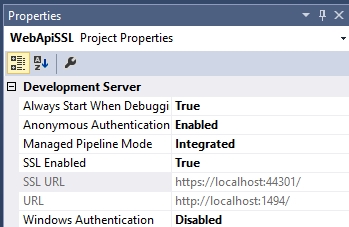
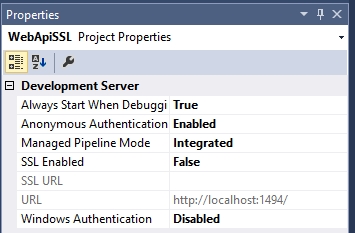
One of the great features of IIS express (that is present in Visual Studio) is to run your application in both default and SSL mode. Go in the properties window of your project and search the setting property "SSL Enabled" by default is set to False. Select "Categorized view" if SSL is not shown.


Set the "SSL Enabled" property to True.


Once you change the value, Visual Studio set in automatic the SSL URL, e.g., https://localhost:44301/

You’ll likely get a message in the browser saying that the localhost address is not trusted, you can continue to the website at your own risk. The problem is that the certificate that was installed automatically for you by Visual Studio is not trusted. The certificate must be imported into the trusted root certification authorities folder.

You may recover, provided you have the certificate in your local store. To recover your certificate, perform the following steps:

  1. Navigate to Start, click Run, then enter MMC.
  2. Click File, then click Add/Remove Snap-in.
  3. Click Certificates, then click Add.
  4. Click Computer Account, then click Add.
  5. Choose Local Computer.
  6. Choose the Personal Certificates folder.
  7. Locate and highlight the certificate with the error.
  8. Right-click Copy.
  9. Move to the Trusted Root Authority and right-click Paste.

Visual Studio Build tools are a different download than the IDE

click here and download the setup vs_buildtools

https://aka.ms/vs/15/release/vs_buildtools.exe

Go in command line shell and write

vs_buildtools.exe --add Microsoft.VisualStudio.Workload.MSBuildTools

After installation is completed, you will have a new msbuild

C:\Program Files (x86)\Microsoft Visual Studio\2017\BuildTools\MSBuild\15.0\Bin\MSBuild.exe

Try yourlsef, go in the shell and write

C:\>"C:\Program Files (x86)\Microsoft Visual Studio\2017\BuildTools\MSBuild\15.0\Bin\MSBuild.exe"

You have as result:

Microsoft (R) Build Engine versione 15.3.409.57025 per .NET Framework
Copyright (C) Microsoft Corporation. Tutti i diritti sono riservati.